How to Create a Mug Shot with AI
Learn how to create a mug shot using AI tools. This guide covers lighting, composition, styling, and how to replicate the look with Nim templates.
By Nim
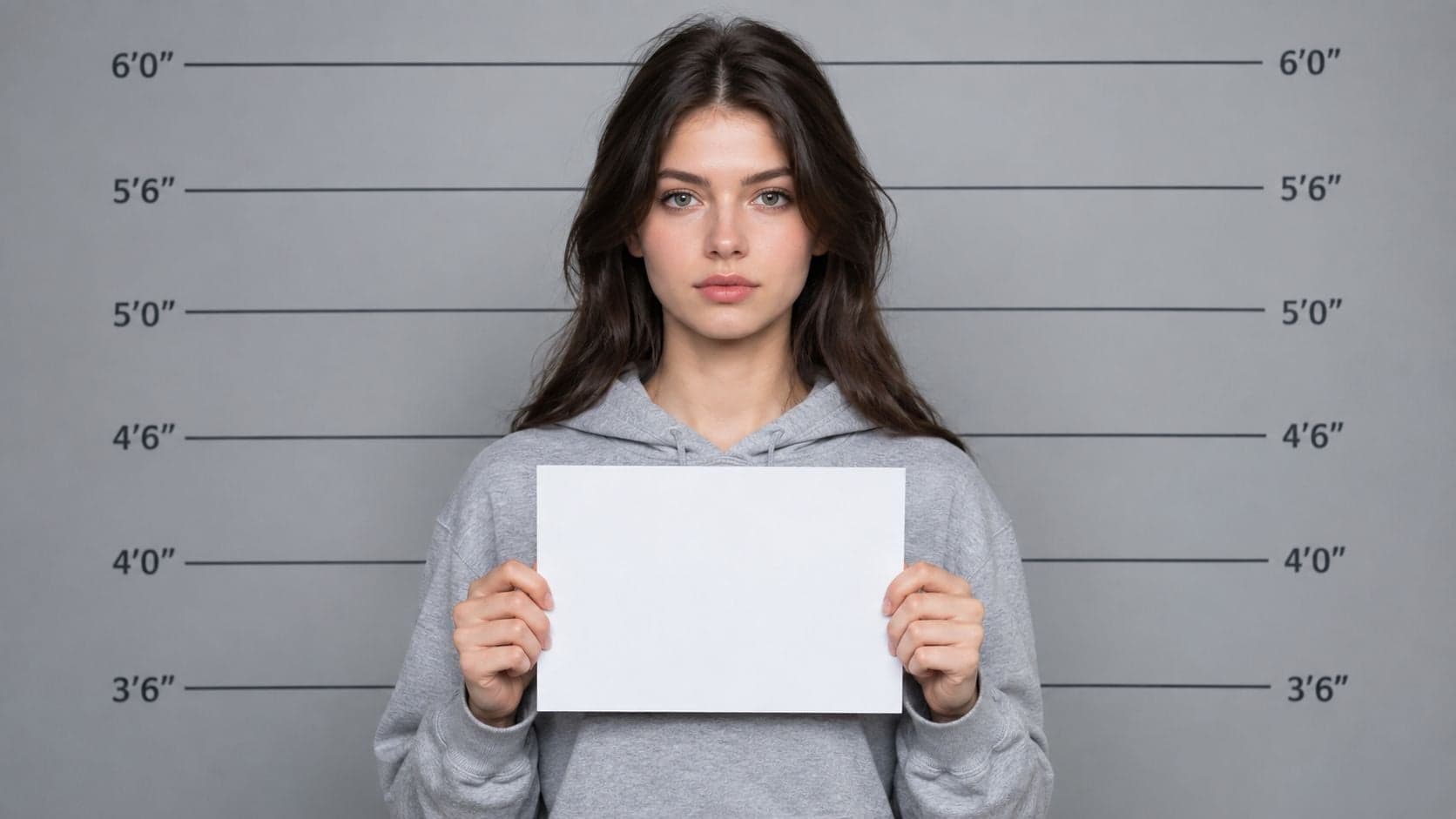
You need a mug shot-style image for a meme, character poster, music campaign, or short video, but a standard portrait looks too polished. The solution is to build the visual language deliberately: a square-on pose, controlled illumination, neutral expression, uncluttered background, and clearly fictional identification details. AI can reproduce that aesthetic efficiently, but the source image still determines how credible and consistent the result looks.
A creative mug shot must also remain distinct from authentic law-enforcement documentation. The strongest workflow treats forensic conventions as visual references, not as permission to imply a real arrest, criminal record, or official police image.
The Appeal of the Mug Shot Aesthetic
A mug shot communicates a story before the viewer reads a caption. A neutral stare suggests defiance, notoriety, exhaustion, or comic embarrassment. That makes the format useful for meme graphics, indie film posters, music artwork, game character sheets, and deliberately provocative brand campaigns.
The look works because it strips away the usual portrait cues. There's no aspirational setting, flattering pose, or lifestyle prop. Instead, the subject faces the camera against a plain background, often with an identification placard, height chart, or stark typography. Those details imply an institutional record, even when the image is entirely fictional.
The visual language has a long photographic history. Criminal photography began soon after photography became public in 1839, with police in Belgium making prisoner daguerreotypes in the early 1840s and U.S. police departments photographing arrested people by the 1850s. The format most viewers recognize today was standardized in the 1880s by Alphonse Bertillon in Paris, who paired frontal and profile views with measurements and written descriptors. The Paris Police Prefecture adopted his system in 1882, helping turn the mug shot into a global identification tool, as documented by Encyclopaedia Britannica's history of the mug shot.
That history explains why a cheap “crime filter” often fails. The visual effect isn't just contrast, grain, or a fake placard. It depends on consistency between pose, lighting, crop, background, and typography. If those elements disagree, the image reads as a costume portrait rather than a controlled booking-photo parody.
Creative rule: Use the visual grammar of a booking photo, but add enough fictional context that viewers understand the image is art, entertainment, or parody.
AI is especially useful when a production needs several characters in the same visual system. Rather than staging a police-style setup for every performer, a creator can prepare consistent source portraits and apply the same treatment across a cast, campaign, or fictional world. The creative advantage comes from repeatability, not from making the image indistinguishable from a real record.
Anatomy of a Standard Booking Photo
A convincing recreation starts with the photographic conventions that define the format. Realistic styling doesn't require copying a government record, but it does require understanding why the image looks the way it does.

Build the face-first composition
Begin with a clean, front-facing source. Facial-recognition photography guidance recommends that the subject face the camera directly, with the full face visible, ears exposed, and no facial expression, according to facial-recognition photography guidance from the Michigan State Police. Those constraints help an AI system preserve recognizable facial structure instead of interpreting a dramatic angle or smile as part of the intended design.
Keep the head centered and avoid hair covering the ears, eyes, cheeks, or jawline. A slight turn can make a normal portrait feel more natural, but it weakens the controlled, standardized quality associated with a mug shot. The source should also contain one person only, with no sunglasses, extra faces, decorative borders, or text that could be mistaken for part of the subject.
Use flat, balanced illumination
The lighting should be even across the face and background. Forensic and police-photo guidance converges on flat, front-facing illumination with minimized shadows. NIST-derived best-practice documents specify minimum three-point balanced illumination and warn against hot spots on cheeks and foreheads, while law-enforcement training recommends soft front lighting with diffusion and enough distance to avoid glare or heat, as outlined in this investigative photography guidance.
A useful official-style benchmark is a 2:1 to 3:1 lighting ratio, also covered in the same guidance. That range keeps the face readable and standardized while retaining modest dimensionality. Strong side light, deep eye sockets, or a bright forehead can create a dramatic editorial portrait, but they move the result away from the booking-photo reference.
For a direct portrait workflow, Nim's Studio Portrait page is the relevant starting point for preparing a controlled source image. The final creative treatment can then add the institutional cues, but no template should be expected to repair severe shadows, a hidden ear, an extreme crop, or a face turned away from the camera.
Decide whether to show one view or two
Traditional Bertillon identification paired a frontal view with a profile view and written measurements. A single fictional portrait can still evoke the style, but a two-view layout communicates the reference more clearly for character boards, posters, or mock case files.
The distinction matters. A single front-facing frame works well for social content and thumbnails. A frontal-plus-profile composition works better when the design needs to suggest a complete identification sheet, though it also increases the risk that viewers could mistake the result for authentic documentation. Fictional names, invented case labels, and an unmistakable “artwork” or “parody” mark can keep the context clear.
Generating the Look with Nim Templates
Nim's template directory explicitly includes a “Mug shot” template, confirming that the task is intended inside the product rather than being a generic prompt-writing exercise. The safest approach is to treat the template as a controlled creative treatment and give it a source image that already satisfies the core photographic requirements.

1. Select a suitable source portrait
Choose a front-facing image with a neutral expression, visible ears, even illumination, and a plain background. A simple head-and-shoulders portrait is usually more useful than a heavily edited selfie because the model has fewer distractions to interpret.
Before uploading, remove anything that could become an unintended identifier. That includes usernames, logos, watermarks, decorative frames, other people, and background objects that might be preserved or exaggerated. The source doesn't need to look like a booking photo already, but it should provide clean facial information.
2. Open the dedicated template
Open the Nim Mug Shot template and provide the prepared source requested by the template. Nim's public template directory confirms the dedicated template is part of the product's intended creation workflows.
The exact controls and available adjustments can vary by template, so the reliable process is limited to the confirmed task: supply the clean image, generate the result, and inspect it before using it publicly. Creators shouldn't assume that every Nim template exposes the same prompt fields, sliders, aspect-ratio controls, or export options.
3. Review the generated identification cues
Look closely at the face, ears, eyes, hairline, and crop. AI-generated lettering can distort names, dates, height markings, or placards, and a generated height chart may not align correctly with the subject. If a label matters to the story, treat it as a design element that requires verification rather than as automatically accurate text.
A good result preserves the subject's identity while adding the intended visual language. A weak result changes facial proportions, introduces extra people, creates asymmetrical eyes, or adds a dramatic light pattern that contradicts the reference.
4. Keep the fiction visible
For a meme or branded creative, fictional identifiers are safer than realistic personal data. Use an invented character name, a clearly imaginary case label, or a visible parody designation. Avoid real booking numbers, genuine police department names, real charges, or details that could connect the image to an actual person.
If the mug shot treatment is part of a broader branded production, surrounding assets can help establish context. Creators developing a campaign can also review video creation templates for brands when the still image needs to become part of a larger commercial content system. For related portrait-based concepts, Nim's portrait photoshoot templates offer a more editorial direction without forcing every visual into a criminal-record aesthetic.
Avoiding Reference Contamination and Ethical Pitfalls
The most important technical risk is reference-photo contamination. A source image can contain information that the creator never intended to reproduce, such as a second face, a visible badge, a school logo, a license plate, a watermark, or text from an original document.
Florida law-enforcement guidance says not to mix mug shot photos with other photos, not to include more than one photo of the same suspect, and to crop or cover portions that reveal identifying information about the subject or bystanders, as described in the Florida eyewitness identification guidelines. For creative AI work, the same principle becomes a preparation checklist.
Normalize the input before generation
Use one subject per frame and keep the face framing consistent across a set. Remove borders, overlays, captions, and background details before generation. Standardized pose, balanced illumination, and uniform background illumination reduce unwanted variation, which is why the source should be corrected before the template is applied rather than left for the model to guess.
The distinction between reference material and public evidence matters. Digital mug-shot circulation has become a large-scale public-record practice in some U.S. states. Researchers estimated that across 21 states that automatically disclose booking photos online, about 4.57 million mug shots are released each year, totaling more than 22.8 million over five years and 45.7 million over a decade, according to the Cambridge study on digitized state criminal records. That scale makes accidental resemblance, false context, and careless reuse more consequential than they might appear in a private design draft.
Make the fictional status unmistakable
A stylized mug shot can be appropriate for a fictional character, but it shouldn't imply that a real person was arrested. Add a clear parody or fictional designation when the image could be separated from its original caption. Avoid presenting generated material alongside real arrest claims, real police insignia, or invented allegations about identifiable people.
A CCTV-style visual can intensify the documentary impression, so creators should apply the same caution when exploring Nim's CCTV camera template. The more an image resembles surveillance or official evidence, the more important the surrounding label and distribution context become.
Safety check: Before publishing, ask whether someone who sees only the image could reasonably mistake it for an authentic booking record. If the answer is yes, strengthen the fictional framing.
Creative Applications for Character and Brand Storytelling
The mug shot aesthetic works best when it serves a larger narrative. A game designer can use a frontal portrait, a profile companion, and fictional identifiers to introduce a character's history. A concert promoter can turn performers into a deliberately rebellious cast. An indie filmmaker can use the rigid composition as a visual counterpoint to a chaotic story.
For a brand, the format needs a clear reason to exist. A streetwear launch might use fictional “case files” for product characters, while a comedy campaign could present harmless, invented offenses tied to the product itself. The design should avoid real criminal allegations and should never use a customer, employee, or public figure in a way that suggests actual wrongdoing without clear consent and fictional context.
Typography completes the image. Pair a restrained sans-serif identification label with a strong display title, but don't let the text imitate a real agency so closely that it creates confusion. A height chart, invented subject name, and “fictional artwork” notice can establish the premise, while color, grain, and crop can place the asset within a poster or social campaign rather than a supposed public record.
Creators working with realistic synthetic imagery should understand the broader issue of manipulated media. A practical overview of how deepfake image makers work can help teams recognize why convincing facial edits require careful labeling and review, especially when a finished design travels beyond its original post.
The strongest final asset usually has a clear hierarchy:
- Subject: Keep the face readable and centered.
- Context: Add fictional identifiers that support the story.
- Typography: Use labels that feel designed, not accidentally official.
- Disclosure: Mark the image as parody, fiction, or AI-assisted when ambiguity is possible.
- System: Reuse the same crop, lighting logic, and type treatment across related characters.
Use the mug shot look as a storytelling device, not as a claim of evidence. Prepare a clean portrait, apply the dedicated treatment, inspect every identifier, and place the result inside a clearly fictional design system.
Nim includes a dedicated Mug shot template for turning a prepared portrait into a stylized booking-photo visual, alongside other template-based image and video creation workflows. Visit Nim to open the relevant template and start with a clean, front-facing source image.
- create a mug shot
- AI mug shot
- mug shot template
- AI photo generator
- Nim video