Virtual Staging AI: A Practical Guide for Empty Rooms
Learn how to stage empty rooms with virtual staging AI. Step-by-step workflow, input prep, disclosure rules, and limits for real estate listings.
By Nim
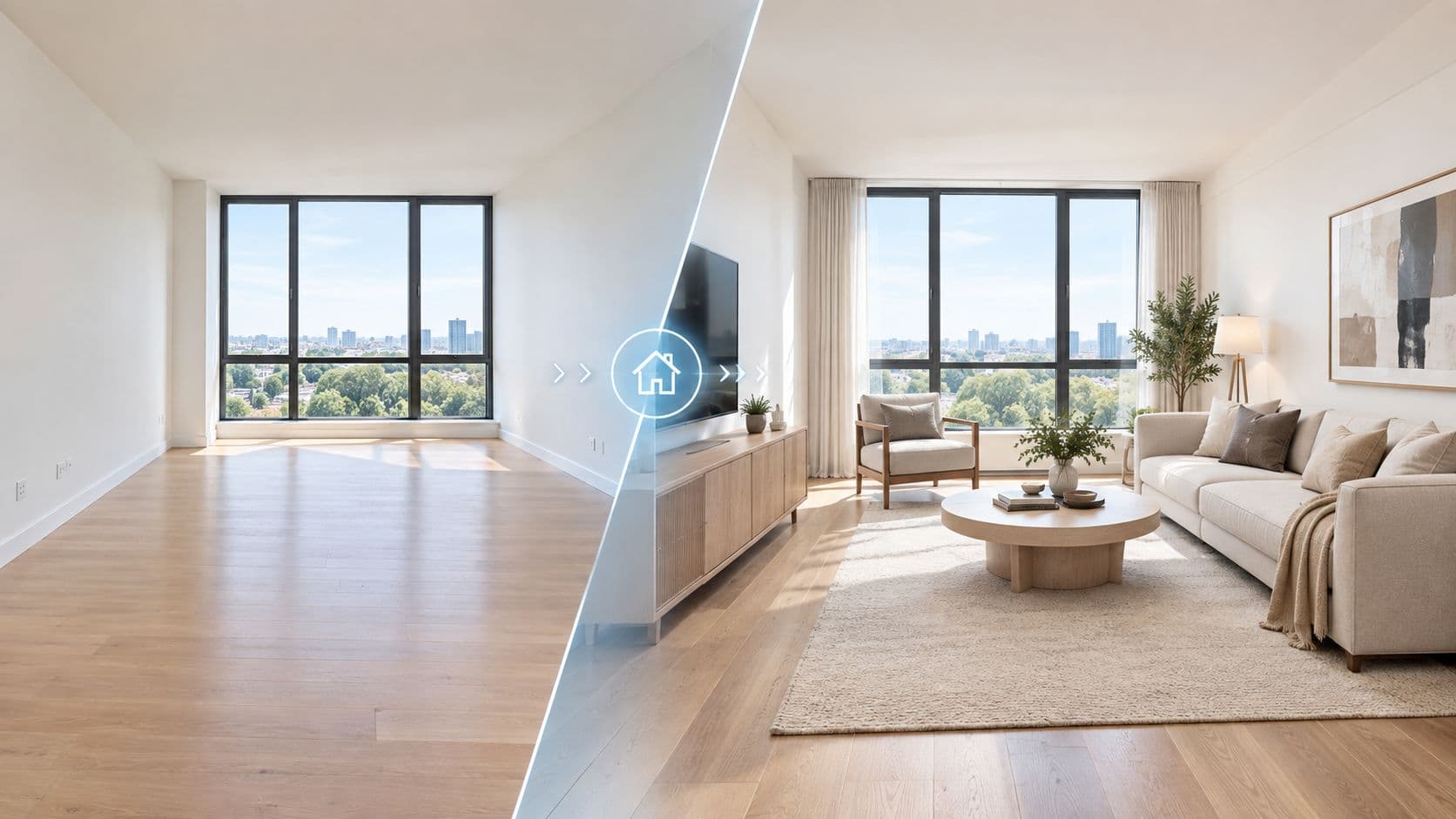
An empty room can make a sound listing feel smaller, colder, and harder to understand. Virtual staging AI gives buyers a visual suggestion of how that room could function, but the generated image is still a marketing composite, not a measurement, inspection, or promise about the property. The reliable workflow is simple: prepare an accurate source photo, generate a staged version, inspect every detail, then publish the staged image with the disclosure and original image required by the relevant market.
What Virtual Staging AI Actually Does to an Empty Room
A vacant listing photo gives the model a fixed visual starting point. Virtual staging AI analyzes that image and generates furniture, decor, and room styling inside the existing scene, creating a furnished interpretation of how the space might look when occupied.
That distinction matters. The result can help a buyer understand possible furniture placement and room purpose, but it doesn't measure the room, verify square footage, certify dimensions, or accurately reproduce every lighting condition. A sofa that appears comfortable in the render may be too large for the actual space, and daylight in the generated image may not match the room at different times of day.

The output is a styled composite
The AI may preserve the broad structure of the source photo, but it can alter visual details while adding furnishings. Perspective, finishes, fixtures, reflections, and apparent room volume may drift from what exists on site. That means the staged image should support the listing, never replace accurate photography or written property information.
A practical review should ask:
- Does the room remain recognizable? Compare walls, windows, doors, flooring, and fixed fixtures with the original.
- Could the proposed furniture fit? Treat scale as an informed visual suggestion, not a dimensional guarantee.
- Would a buyer understand the alteration? If furniture or other visible elements were digitally added, the image needs appropriate labeling before publication.
For broader operational guidance, AgentPulse staging software tips can provide additional context on incorporating staging into a property-marketing process. For the actual image task, the Nim virtual staging workflow is designed around turning an empty interior image into a staged listing visual that can be reviewed before use.
Preparing Source Photos Before You Upload
The generated result depends heavily on the source image. A clean, well-composed photograph gives the model clearer information about wall boundaries, floor direction, window placement, and the light falling across the room.
Capture the room clearly
Shoot from approximately chest height with a wide-angle lens, while keeping vertical lines straight. The photograph should show enough floor area and wall junctions for the model to infer where furniture belongs, but it shouldn't exaggerate the room with extreme distortion.
Use even, natural-feeling light. Correct exposure and noticeable color casts before upload because a warm or green source image can push furniture, walls, and textiles toward implausible colors. Keep the original file archived separately so the edited source and the eventual staged image can be paired later.
Remove personal belongings, small debris, loose packaging, and items that could be mistaken for permanent features. Stray cords, television wires, tape marks, and outlet covers can also be reinterpreted by the model, so they should be removed or masked where practical.

Keep the file set organized
Export at the highest practical resolution in JPG or PNG format. Use room and angle names that remain clear when several versions exist, such as LivingRoom_NE.jpg or Bedroom_Window.jpg. After staging, a matching suffix can identify the generated version without separating it from the original.
Avoid heavy HDR, strong grain reduction, or aggressive perspective correction. These treatments can create halos, unnatural edges, and inconsistent surfaces that make it harder for the model to interpret the room. If a source image needs technical improvement before staging, an image enhancement workflow can be considered, but the enhanced image should still be checked against the original for accuracy.
Practical rule: Improve the photograph before asking AI to furnish it. Staging should solve vacancy, not rescue poor exposure, distorted geometry, or an unclear camera angle.
Running the Virtual Staging Template in Nim
The task should be handled one room at a time. Before opening the template, retain a local copy of every unedited source image because the original will be needed for comparison, internal records, and any disclosure workflow required by the listing destination.
Use the confirmed template flow
Open the Nim Virtual Staging template and provide a prepared source image for the room being staged. Follow the room and style inputs presented on the template page rather than assuming that a separate prompt field, style picker, or negative-prompt control is available.
Each source photo should be treated as a separate generation job. This keeps the review clear and makes it easier to identify which room or angle needs another attempt without losing track of the rest of the listing package.
The core process is:
- Prepare one room image. Use the corrected source photo and keep its original filename in the local archive.
- Open the template. Upload the selected image and use the standard inputs shown there.
- Generate the staged image. Submit that room as its own job.
- Review the returned result. Compare it inside Nim with the source image before deciding whether it belongs in the publication set.
- Download the approved version. Save only the result intended for listing, advertising, or internal review.
Preserve the relationship between files
A consistent naming pattern prevents the staged image from becoming detached from its source. If the original is LivingRoom_NE.jpg, a related staged file might use a clear staging suffix, such as LivingRoom_NE_virtually-staged.jpg. The exact local naming convention can vary, but the relationship should remain obvious to anyone handling the listing later.
The downloaded image also shouldn't be treated as a factual room record. It represents a styled possibility. Reviewers should confirm that it doesn't introduce furniture that blocks important features, change the apparent layout, or create a visual impression the property can't support.

Reviewing Results for Geometry and Consistency
The first generated image is a draft. A polished room can still contain errors that become obvious when a buyer enlarges the photo or compares it with another angle.
Inspect edges before style
Start with the structural boundaries. Corners, ceiling lines, baseboards, door frames, windows, and wall junctions are common failure points. Look for crown molding that bends, floating baseboards, shifted door frames, or window mullions that weren't present in the original.
Furniture should sit naturally on the floor plane. A chair leg that disappears, a table that tilts, or a sofa that seems to hover usually signals a perspective problem. Reflective surfaces need particular attention because glossy flooring, stainless appliances, and mirrors can contain invented rooms or duplicate furniture.
Then compare the generated image with the original for room volume and layout. L-shaped rooms, open-plan areas, vaulted ceilings, low ceilings, dark photos, reflective materials, and unusual geometry are more difficult because the model has less obvious structure to follow. Independent guidance also notes that circular or highly irregular rooms can fail, and that specific branded furniture may not be reproduced reliably. JinkoMage's discussion of AI virtual-staging limits provides useful background for this review problem.
Check the whole image set
A room that looks acceptable from one angle may not remain coherent from another. Compare the primary staged image with secondary views and check whether the sofa shape, furniture scale, color palette, and window treatments remain plausible. If the arrangement changes dramatically, the set can feel artificial even when each individual image looks attractive.
| Failure Mode | Where to Look | Fix |
|---|---|---|
| Warped architecture | Corners, molding, baseboards, door frames | Reject or regenerate the image, then compare against the original |
| Floating furniture | Chair legs, sofa feet, tables, rugs | Check contact with the floor plane and remove visibly tilted results |
| Reflection errors | Mirrors, glossy floors, appliances, glass | Inspect reflected objects for duplicates or invented spaces |
| Incorrect room volume | L-shaped rooms, open plans, narrow areas | Compare wall boundaries and usable floor area with the source |
| Angle inconsistency | Sofa, palette, decor, window treatments across views | Keep only a set that maintains a coherent visual story |
| Dark or irregular geometry | Shadowed corners, vaulted ceilings, circular rooms | Use a clearer source or treat the result as a concept rather than a listing asset |
Disclosing Staged Images Before Publication
A virtually staged image is an advertising asset, so the compliance handoff must happen before publication, not after a buyer asks whether the furniture exists. Requirements vary by jurisdiction and MLS, but current guidance consistently treats material digital changes more seriously than ordinary corrections such as cropping, white balance, lens correction, or exposure blending.
California's AB 723, as summarized in current guidance, makes willful non-disclosure of AI-altered listing images a criminal misdemeanor effective January 1, 2026. The same guidance says digitally altered photos must be disclosed and the original image made available, while California-specific guidance describes a reasonably conspicuous disclosure on or adjacent to the altered image and a link, URL, or QR code to the unaltered version. California virtual-staging disclosure guidance explains the operational significance of that rule.
Label the image and the listing
For California listings, AB 723 is described as applying when editing software or AI adds, removes, or changes visible property elements, with a disclosure requirement for the altered image and access to the original. The AB 723 disclosure summary from Amplifiles specifically describes a reasonably conspicuous notice on or adjacent to the image and a link, URL, or QR code to the original unaltered photo.
A practical label can use plain language such as “Virtually Staged” or “Digitally Altered”, provided it meets the applicable local and MLS requirements and remains visible in the published asset. The listing remarks should also identify which photos were staged. Don't rely on a disclosure hidden in a separate document if the platform or jurisdiction expects the notice on the image, in its caption, or in the public remarks.
Current MLS-oriented guidance recommends identifying virtually staged, AI-generated, or AI-enhanced images in the caption, on the image, or in agent or public remarks. It also recommends including at least one unaltered “before” image for each altered room or area. NorthstarMLS guidance on AI-enhanced listing photos provides that pairing model.

Build the disclosure into file handling
Keep the original un-staged photo in the same listing package as the generated image. Matching filenames make the relationship clear, for example, Kitchen_West.jpg alongside Kitchen_West_virtually-staged.jpg. Store the approved disclosure wording in the listing template or transaction checklist so a fast upload doesn't omit it.
The trigger may extend beyond furniture. Guidance identifies edits involving clutter, landscaping, neighboring properties, wall color, flooring, fixtures, and room dimensions as potentially material changes. SofaBrain's explanation of virtual-staging disclosure is useful when deciding whether an edit has crossed from presentation into alteration.
Where AI Staging Helps and Where It Falls Short
AI staging earns its place when the room is empty, the listing needs a visual quickly, or a marketer wants to show a plausible furnishing direction before committing to physical staging. It can also help with occupied properties that need a cleaner pre-marketing concept and renovation projects where empty interiors don't communicate the intended use.
The economic case is meaningful. A 2025 ROI study of 12,000 European listings reported a 73% reduction in days on market and a 118% increase in listing click-through rates for AI-virtually-staged properties. It also reported a median of 18 days on market for staged properties versus 67 days for matched vacant listings, and said AI staging was 97% more cost-effective than traditional physical staging. These are study-specific results, not guaranteed outcomes for every market or listing. The EstIQ virtual-staging ROI study contains the cited methodology and figures.
A separate industry projection placed the global virtual staging AI market at $210 million in 2024, with a projected rise to $1.65 billion by 2033, implying a 25.6% CAGR over 2024 to 2033. StageHQ's virtual-staging statistics guide presents that projection as market context, not as a performance promise for an individual listing.
The real trade-off is control
AI staging is faster to revise than physical furniture, and it can show more than one broad style direction without arranging another shoot. But style control remains approximate. A marketer can guide the visual character, yet the model may not reproduce a particular furniture item, custom millwork detail, or unusual architectural feature accurately.
A 2026 category benchmark reported per-room AI staging costs of roughly $2 to $5, compared with about $39 per room for manual virtual staging, while noting that physical staging remains substantially more expensive. The same report described claims that virtually staged homes sell about 73% faster and may command a 1% to 10% price premium, but it explicitly says those figures vary by market and should be treated as directional. Morphed's virtual-staging statistics should therefore inform workflow planning, not seller promises.
For source-quality problems, a separate real estate image upscaling solution may help improve a photograph before staging, but no enhancement tool fixes a misleading layout or removes the need for disclosure.
A Repeatable Staging and Disclosure Checklist
A repeatable process should produce both the public-facing image and the evidence needed to explain it.
- Source package: Save corrected, high-resolution room photos with clear room and angle names. Keep the untouched originals in a separate archive.
- Photo preparation: Remove personal items, cords, debris, and distracting marks. Correct exposure and color without applying aggressive HDR or distortion.
- Template generation: Upload one prepared room image at a time to the Nim template, use the inputs shown there, and save each generated result with a staging suffix.
- Visual review: Compare every result with its source. Check geometry, reflections, furniture contact with the floor, room volume, and consistency across angles.
- Approval set: Keep only images that represent the room accurately enough for the intended marketing use. Reject warped, misleading, or materially inconsistent renders.
- Original pairing: Store each approved staged image beside its matching unaltered image so agents, cooperating professionals, appraisers, and buyers can compare the views.
- Disclosure caption: Prepare wording that matches the applicable MLS and jurisdiction. For California, account for AB 723 requirements and the related access to the original image. Elsewhere, follow equivalent local rules.
The next practical step is to run this checklist on the next empty listing, then compare the staged rooms with buyer questions and booked showings. That review will show which spaces benefit from visual furniture guidance without confusing the property's actual condition.
Nim provides a template-based workflow for turning prepared empty-room photos into staged listing visuals, with generation, review, and download handled in the same process. Visit Nim to open the virtual staging workflow and prepare the next property image set with its original-photo and disclosure package intact.
- virtual staging ai
- ai staging
- real estate photos
- empty room staging
- listing photos